← All products
Productivity · 14-day free trial · macOS 14+ · Apple Silicon
Time tracking that starts itself.
A minimal menu-bar tracker that starts the moment you turn on a macOS Focus, auto-tags your work by app and window, and exports a weekly timesheet. No button to forget.
14-day free trial · one-time license · macOS 14+ · Apple Silicon · signed & notarized DMG
The problem
The reason time tracking never sticks is the part where you have to remember to hit start. Then on Friday you're reconstructing where the hours went from memory. Enterprise trackers are monthly subscriptions built for teams; the indie ones still wait for you to press a button.
How it works
1
Turn on a Focus
Tracking begins automatically the moment a macOS Focus you choose turns on. Turn it off and it stops.
2
It tags itself
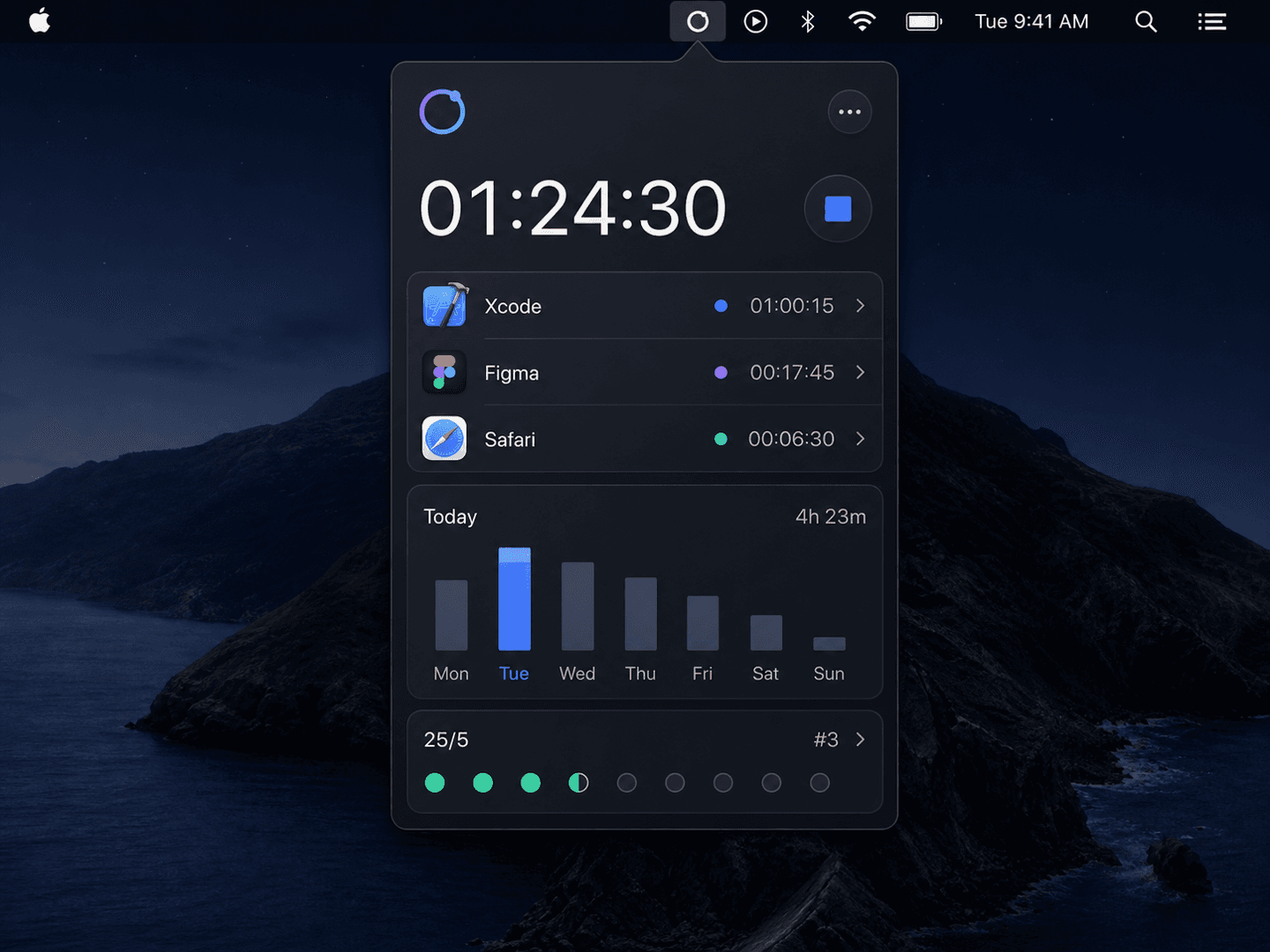
Each block is auto-tagged by the app and window you were in — Xcode reads as code, Figma as design.
3
Export your week
One click exports a clean weekly timesheet CSV for client invoices or your own review.
What it does
Starts with your Focus
Turn on a macOS Focus and tracking begins automatically. Turn it off and it stops. No button to forget.
Auto-tag by app and window
Xcode reads as code, Figma as design. Each block is tagged by the app and window title you were in.
Pomodoro built in
A 25/5 cycle runs alongside automatic tracking — structure your day without a second app.
Weekly timesheet CSV
Export a clean weekly timesheet for client invoices or your own review. Tag projects by hand when you want to.
Without it
- ✕You forget to hit start, so half the day goes untracked
- ✕Reconstructing the week from memory every Friday
- ✕Enterprise trackers are monthly subscriptions for teams
- ✕Indie trackers still wait for you to press a button
With Focus Time Tracker
- ✓Tracking starts the instant your Focus turns on
- ✓Every block auto-tagged by app and window
- ✓$9.99 once — no team seat, no subscription
- ✓A weekly timesheet CSV, ready to invoice
$9.99one-time
✓14-day free trial✓$9.99 one-time✓Up to 3 Macs✓No subscription
Built by the team behind IMESync — a shipping macOS utility. Same focus on native, private, one-time-purchase tools.
FAQ
- How does it know when to start?
- It watches macOS Focus state. When a Focus you choose turns on, tracking begins; when it turns off, tracking stops. You can also start and stop by hand.
- What gets stored?
- Everything is tracked and stored locally on your Mac. Window titles are used only to tag your own blocks and never leave your Mac.
- Is there a subscription?
- No. $9.99 once, lifetime updates.
- What do I need to run it?
- An Apple Silicon Mac (M1 or later) on macOS 14 or above. Signed and notarized DMG.