← All products
Developer Tools · 14-day free trial · macOS 15+ · Apple Silicon
Stop hunting for the process on port 3000.
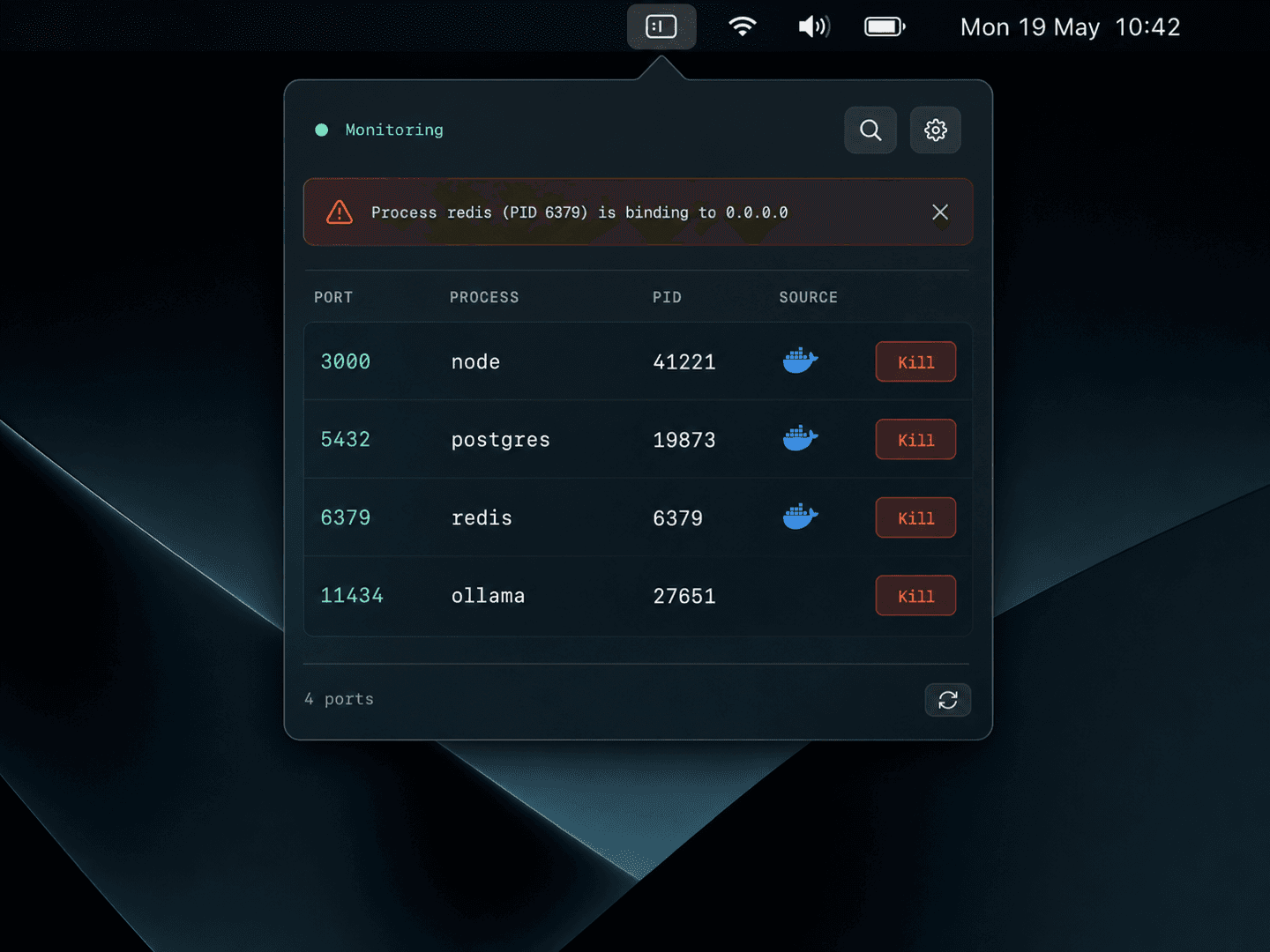
Every port, every process, Docker containers included — in your menu bar. See what's holding a port and kill it in one click.
14-day free trial · one-time license · macOS 15+ · Apple Silicon · signed & notarized DMG
The problem
You run Vite, Next.js, Postgres, Redis, Ollama and three Docker containers at once. A build fails: port already in use. Now you're hunting through lsof and docker ps to find the culprit.
How it works
1
Glance at the menu bar
Port, process, PID, and Docker container in one always-on list. No more lsof archaeology.
2
Spot the culprit
'Port already in use' — see exactly which process or container owns it, instantly.
3
Kill in one click
SIGTERM first, SIGKILL if it hangs. Or copy the command to run it yourself.
What it does
Every port, one menu
Port, process, PID, and Docker container in a single always-on menu bar list. No more lsof archaeology.
Docker containers integrated
Reads docker ps automatically and shows each container's name and port mapping next to your local processes.
One-click kill
Pick a port, confirm, gone. SIGTERM first, then SIGKILL if it hangs. Copy the command if you'd rather do it yourself.
Suspicious binding alerts
Get a macOS notification when something binds to 0.0.0.0 or an external interface unexpectedly — a quiet security tripwire.
Without it
- ✕Hunting through lsof and docker ps for the culprit
- ✕'Port already in use' with no idea what's holding it
- ✕Switching between terminal and Docker Desktop
- ✕No heads-up when something binds to 0.0.0.0
With Dev Port Monitor
- ✓Every port, process, and container in one menu
- ✓See exactly what owns a port, instantly
- ✓One-click kill — SIGTERM, then SIGKILL
- ✓Alert when something binds to an external interface
$9.99one-time
✓14-day free trial✓$9.99 one-time✓Up to 3 Macs✓No subscription
Built by the team behind IMESync — a shipping macOS utility. Same focus on native, private, one-time-purchase tools.
FAQ
- Does it work with Docker?
- Yes — it reads docker ps automatically and shows each container's name and port mapping next to your local processes.
- Does anything leave my Mac?
- No. Port and process data is read via standard macOS APIs and never leaves your machine.
- Is there a subscription?
- No. $9.99 once, lifetime updates.
- What do I need to run it?
- An Apple Silicon Mac (M1 or later) on macOS 15 or above. Signed and notarized DMG.